

Here is a closer look at the E5, Nokia’s answer to internet savvy business-oriented users. The device is practical, loaded with features that cater for people like me, making things easier to stay connected with my friends and business contacts through chat, email, and social media.
Buttons!
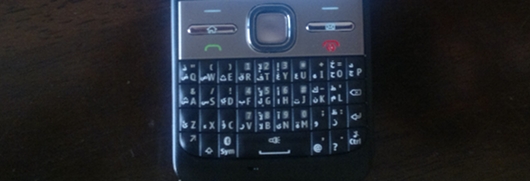
Despite the buttonless trend is leading smart phone designs, the E5 comes fully loaded with a complete keyboard and a set of extra buttons that eases your way around the device, specially with the Navi Scroll Key from Nokia, which occupies a central position within the phone for an easier multi-direction navigation for mobile menus, and a full control over the camera.
Now truth be told, having a physical keyboard makes life a little bit easier, typing seems to be easier and faster with the real keyboard rather than the virtual one, it also maintains the classical look and feel of a mobile phone.
Customization
The screen, which is relatively big, can be customized to include all kinds of shortcuts you might need, from thumbnails for your important contacts, to social media, maps, email, chat and other apps you need to access with a single click.
As I mentioned before, the Navi key is a handy way to work around the E5, you can scroll in all directions for a quicker access to various shortcuts you assign on the main screen, which gives the phone even more practicality.

Connectivity
Internet is getting more mobile over time, so it’s natural to see smart phones evolving to offer users the daily ingredient of their digital life, from social media, to email and chat.
With the E5 there are many ways to stay connected to your friends and business contacts, starting with the instant messaging, which is an integral element within the device with several built-in chatting apps like the Nokia Ovi chat, G-Talk and MSN Messenger, in addition to the range of apps available on the Ovi store including Skype and the eBuddy messenger, this is a cool feature that keeps you connected.
Another aspect of connectivity in the E5 is the Social Media, you can simply connect to social networks such as twitter and facebook easily, in addition to other social apps for YouTube, MySpsce, Friendster and hi5, but I think they should of added LinkedIn, at the end of day this phone is mainly targeted at business people.
Emailing is one of the three basic digiral life elements offered by this device, you can setup your email easily whether it was Gmail, Yahoo!, Ovi, or your own company’s email using the Lotus Notes.

Camera
The E5 is equipped with a 5-megapixel camera that comes with a decent range of settings for both video and still photos, the camera resolution is 2592 x 1944, and can shoot videos with a resolution of 640×480
It might not sound impressive when compared to other phones, but let’s keep in mind that the E5 is not meant to be an entertainment hub, and when it comes to the internet, you don’t really need a bigger camera, smaller images means faster upload time and less storage space. 5-megapixel can diffidently guarantee a decent quality for your images.

Maps
One of the cool feature I liked about the E5 is the maps, you can simply turn the device into a navigation system that gives you voice directions in both Arabic and English as you drive, or even walk, to your destination.
I’ve never been a big fan of location sharing apps, but this is another cool feature I came across in the E5, simply log in to your Nokia account and update everybody with your location.


