Taking PDF Security to a New Level with Adobe Reader and Adobe Acrobat


Acrobat X Family of Products Raises the Bar
The new security features in Adobe Reader X and Adobe Acrobat X help reduce the risk posed by PDF-based malware.
Adobe Reader X and Adobe Acrobat X take the security of PDF documents—and your data—to a whole new level. Engineered with security in mind, the Adobe Reader X and Adobe Acrobat X deliver better application security thanks to Protected Mode and new capabilities that allow more granular controls, tighter integration with both the Microsoft® Windows® and Apple Mac OS X operating system architectures, and improved deployment and administration tools.
In addition, the Adobe Secure Software Engineering Team (ASSET) and the Adobe Product Security Incident Response Team (PSIRT) work together to help ensure that your data is safe and secure when you use Adobe products. Supplementing our internal security efforts, Adobe’s involvement in the Microsoft Active Protections Program (MAPP) ensures the advance information sharing of product vulnerabilities with security software providers, such as antivirus and intrusion detection and prevention vendors, so the industry can work together to reduce the risk of vulnerabilities in Adobe Acrobat X and Adobe Reader X.

Improved Application Security
Protected Mode in Adobe Reader X
To protect you and your organization from malicious code that attempts to use the PDF format to write to a computer’s file system, Adobe provides Protected Mode, an implementation of cutting-edge ‘sandboxing’ technology.
Enabled by default whenever you launch Adobe Reader X, Protected Mode helps prevent attackers from installing malware on a user’s system, thereby reducing the risk of potential security threats. Specifically, Protected Mode limits the level of access granted to the program, safeguarding systems running the Microsoft Windows operating system from malicious PDF files that may attempt to write to the computer’s file system, delete files, or otherwise modify system information.
In addition, as part of the company’s ongoing efforts to integrate security into every stage of the product lifecycle through the Adobe Secure Product Lifecycle (SPLC) process, Adobe conducts regular reviews of existing code and hardens it as appropriate, further improving application security and enhancing the safety of your data when you use Adobe products.
JavaScript Execution Control
The Adobe Acrobat X family of products offers sophisticated and granular controls for managing JavaScript execution in both Windows and Mac OS X environments. The Adobe JavaScript Blacklist Framework allows JavaScript to be used as a part of business workflows while protecting users and systems from attacks that target specific JavaScript API calls.
By adding a specific JavaScript API call to the blacklist, you can block it from executing without completely disabling JavaScript. You can also prevent individual users from overriding your decision to block a specific JavaScript API call, helping to protect your entire enterprise from malicious code. In Windows environments, the blacklist is maintained in the Windows registry; in Mac OS X environments it is stored in the Mac OS X FeatureLockdown file.
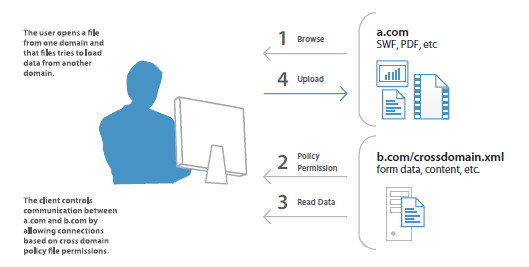
Cross-domain Configuration
By default, the Adobe Acrobat X family of products disable unrestricted cross-domain access for both Microsoft Windows and Mac OS X clients, preventing attackers from exploiting rich PDF files to access resources in another domain.
By leveraging the built-in support for server-based cross-domain policy files, you can allow Adobe Acrobat X and Adobe Reader X to handle data across domains. This cross-domain policy file—an XML document—is hosted on the remote domain, granting access to the source domain and allowing Adobe Acrobat X or Adobe Reader X to continue the transaction.
You’ll want to enable Adobe cross-domain support when you:
Need selective cross-domain access and want to leverage other features, such as recognition based on a digital certificate;
Want to centrally manage cross domain access permissions from a single, server-based location;
Implement workflows that include data requests from multiple domains for returning form data, SOAP requests, references to streaming media, and Net.HTTP requests.
User-friendly Security Alerts
The Adobe Acrobat X family implements a user-friendly method of security alerts through a non-intrusive Yellow Message Bar (YMB). The YMB replaces traditional dialog boxes that obscure content on the page, making it easier for the user to view and respond to the alert.
In Adobe Acrobat X or Adobe Reader X, the YMB appears at the top of the document with the warning or error message. The user can choose to trust the document “once” or “always”. Choosing “always” adds the document to the application’s list of privileged documents.
When enhanced security is enabled and the PDF file is not already set as a privileged (e.g., trusted) location, the YMB appears when the file tries to execute a potentially risky action, including:
Invoke cross-domain access
Run JavaScript
Invoke a JavaScript-invoked URL
Call a blacklisted JavaScript API
Inject data
Inject scripts
Play embedded legacy multimedia
The ‘Options’ button allows users to set trust, on the fly, once or always. Enterprise-wide, you can also pre-configure trust for files, folders, and hosts so that the YMB never appears in a trusted, enterprise workflow.
Tighter Integration with Operating System Architectures
Always-on Security
Providing an additional layer of defense against attacks that attempt to control desktop systems or corrupt memory, the Adobe Acrobat X family of products take advantage of built-in, always-on security protections in the Microsoft Windows and Mac OS X operating systems.
Data Execution Prevention (DEP) prevents placement of data or dangerous code into memory locations that are defined as “protected” by the Windows operating system. Apple offers similar executables protection for Mac OS X 10.6 in the 64-bit Safari browser.
Address Space Layout Randomization (ASLR) hides memory and page file locations of system components, making it difficult for attackers to find and target those components. Both Windows and Mac OS X 10.6 use ASLR.
Registry-level and plist Configuration
The Adobe Acrobat X family of products give you a variety of tools to manage security settings, including registry-level (Windows) and plist (Macintosh) preferences. With these settings, you can configure clients, both pre- and post-deployment, to:
Turn enhanced security on or off
Turn privileged locations on or off
Specify predefined privileged locations
Lock certain features and disable the application UI so that end users cannot change the settings
Disable, enable, and otherwise configure almost any other security-related feature
Support for Microsoft SCCM/SCUP
With the Adobe Acrobat X family of products, you can efficiently import and publish updates via Microsoft System Center Configuration Manager (SCCM) to ensure that your managed Windows desktops are always current with the latest security patches and updates.
New support for Microsoft System Center Updates Publisher (SCUP) catalogs enables you to automate updates to your Adobe Acrobat X and Adobe Reader X software across your organization as well as streamline initial software deployments. SCUP can automatically import any update issued by Adobe, as soon as it is available, thereby making it easier and more efficient to update your Adobe Acrobat X and Adobe Reader X deployments.
Support for Apple Package Installer and Apple Remote Desktop
In the Adobe Acrobat X family of products, Adobe has implemented the standard Apple Package Installer provided by Mac OS X rather than the proprietary Adobe Installer. This makes it easier to deploy Adobe Acrobat and Acrobat Reader software to Macintosh desktops in the enterprise, because you can now use the Apple Remote Desktop management software to manage your initial software deployment and subsequent upgrades and patches from a central location.
Easier Deployment and Administration
Regular Updates and Patches
To help you keep your software up to date, Adobe proactively delivers regularly scheduled updates that contain both feature upgrades and security fixes. For rapid responses to zero-day attacks, Adobe delivers out-of-cycle patches as needed. Adobe aggressively tests security patches before release to help ensure compatibility with existing installations and workflows.
Adobe also offers the following security websites and notification services:
To view the latest security bulletins and advisories about Adobe products, please visit
http://www.adobe.com/support/security/
You can see the latest security incident reports and vulnerability fixes on the Adobe PSIRT blog at
http://blogs.adobe.com/psirt/
For more detailed information on Adobe products and security features, please visit the Adobe Security Library at www.adobe.com/go/learn_acr_appsecurity_en
Adobe Customization Wizard and AIM
For greater control over your enterprise-wide deployments, Adobe provides these tools:
Adobe Customization Wizard— A free, downloadable utility that enables you to customize the Acrobat Installer and configure application features prior to deployment;
Administrator’s Information Manager (AIM)— An auto-updating, customizable Adobe AIR® application that contains the Preference Reference. AIM also includes a growing list of other resources of interest to enterprise administrators.
Content Security
Beyond application security, Adobe supports an array of industry-standard mechanisms to help secure and authenticate the information stored in your PDF documents, including digital signatures, rights management, and document best practices.
Digital signatures
Digital signatures save time and money compared to “wet” signatures, and they help document authors and recipients ensure the integrity and authenticity of a document’s contents. With Adobe Reader X and Adobe Acrobat X, you can easily add a standards-based digital signature to a document, check that signature for validity, and add permissions and restrictions to control the signature workflow.
Rights management
The Adobe Acrobat X family of products works with Adobe LiveCycle® Rights Management ES2 server software to deliver rights management capabilities that enable you to protect confidential data or other sensitive information from leaking outside your organization or getting into the wrong hands. With it, you can control access, printing, copying, and editing at the document, user, or group level, and dynamically change those policies throughout the lifetime of the document. Plus, because anyone with Adobe Reader can securely access this content, protected documents are easy to view and do not require the recipient to purchase or download additional products or plug-ins. Consistent best practices The new Action Wizard feature in Adobe Acrobat X lets you easily script document processes and deploy them across the organization, helping to ensure that all users are following best practices when preparing and protecting public-facing documents.
Managing sensitive information
Users can consistently and quickly remove sensitive information from files using one-button sanitization and enhanced redaction tools. Powerful, standards-based encryption technologies allow end users to set passwords and permissions to control access or prevent changes to any
Conclusion With the Adobe Acrobat X family of products, Adobe takes the security of PDF documents and your data to a new level. From improved application security and more granular controls to tighter operating system integration and improved deployment and administration tools, Adobe Acrobat X and Adobe Reader X are engineered with security in mind. Plus, Adobe Acrobat X and Adobe Reader X are continuously tested and evolved as new threats emerge by our product security teams. Working together with the Adobe Product Security Incident Response Team (PSIRT), this helps ensure that your data is safe and secure whenever you use Adobe products.
PDF document.
Adobe Systems Incorporated
345 Park Avenue
San Jose, CA 95110-2704
USA
www.adobe.com